Personal Portfolio Website
Skills Gained
React and TypeScript
This site is built using the React framework, and is written largely in TypeScript. I previously had little to no experience with these tools, and this project gave me the chance to explore these tools without constraint. While this made the start of the project a bit slower due to the learning curve, the result is the ability to quickly modify my own site, and create entirely new pages at a much higher speed and quality.
Open-Ended Design
When I began this project it was the first I had done completely of my own accord, with no school or company oversight. It was also not a site intended to host a functional tool, rather, the site itself was the end-goal. These minimal constraints created a new challenge, that of staring at an empty white web-page and a blank VS Code file and trying to design something that represented myself.
Working with AI
Part of what I wanted to do when I began this project was learn how to better utilize AI tools, specifically Claude Code. This was the first time I had used a tool that lived in my terminal and saw my entire code base. My key takeaway is that it is most valuable for teaching and formatting, but can struggle with bringing a design to life and can quickly lead to problems with scaling. In the end, I came up with the entire visual design of this site myself, but used Claude to help implement details such as the animation of the underline between the ‘Home’ and ‘About’ page.
Overview
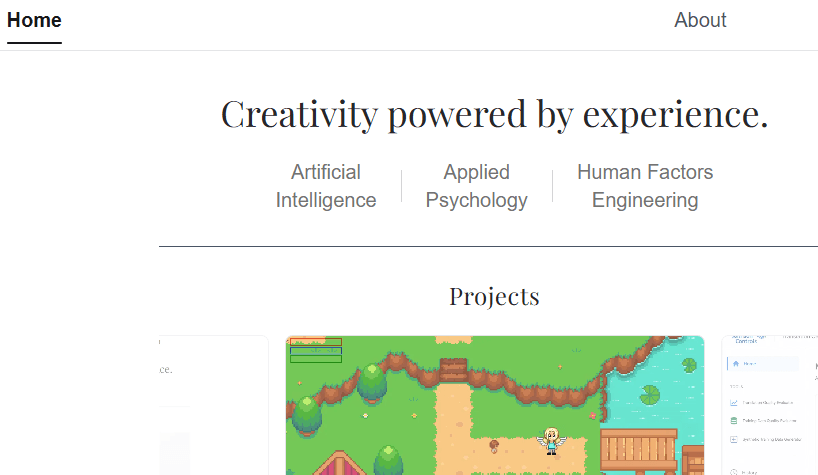
My personal portfolio website is a custom-designed and custom-built site that serves as a living showcase of my technical projects and writing. Rather than reaching for a template or site builder, I built the entire thing from scratch. Treating it as a product in its own right, with the same care I'd bring to any professional software project.
The site is built with Next.js (App Router), TypeScript, React, and Tailwind CSS v4. It includes a home page, an about page, a projects listing page, individual project detail pages, and a papers page.
Home Page & Custom Carousel
The home page features a project carousel I built entirely from scratch (no carousel library). It supports smooth infinite-loop animation, auto-play, and a "peek" effect that shows the edges of adjacent cards to signal there is more content to scroll through. Getting the infinite loop to feel seamless required careful index management and CSS transition handling to avoid any flash or jump when the virtual index wraps around.
Projects Page & Detail Pages
The projects page renders a responsive grid of project cards, each linking to a dedicated project detail page. The routing is handled by Next.js App Router's file-based routing system with dynamic segments, so adding a new project is as simple as dropping in a new content file.
Markdown-Based Content System
Each project's content lives in its own .md file, with YAML frontmatter for structured metadata (title, tags, links, etc.) and a Markdown body for the main write-up. The content is parsed using gray-matter and rendered with react-markdown. Rather than accepting the default HTML output, I mapped every Markdown element, headings, paragraphs, lists, code blocks, links, to fully custom Tailwind-styled React components, giving precise visual control over how each element renders without fighting against a global stylesheet.
Navigation
A shared Navbar component handles site-wide navigation and is composed into every page via the Next.js App Router layout system.
Key Technical Decisions
Next.js App Router with Server Components: I used the App Router rather than the Pages Router to take advantage of React Server Components. Static project content is fetched and rendered server-side, keeping the client bundle lean and page loads fast.
No Carousel Library: Building the carousel from scratch was a deliberate choice. Third-party carousel libraries tend to be opinionated about markup, bring in unnecessary dependencies, and are notoriously hard to style precisely. Writing it myself meant full control over the animation model, the peek behaviour, and the interaction feel — and it turned out to be a more tractable engineering problem than expected.
Markdown + gray-matter for Content: Keeping project content in flat .md files rather than a CMS or database keeps the project simple and portable. gray-matter handles frontmatter parsing cleanly, and the file-based structure maps naturally onto Next.js dynamic routing. Adding a new project requires no schema changes, no database migrations, and no UI — just a new file.
Custom react-markdown Component Map: Accepting the default HTML output from react-markdown would have produced inconsistent styling and required awkward global CSS overrides. Mapping each Markdown element to a custom Tailwind-styled component gives consistent, predictable rendering and makes it easy to update the design in one place.
Tailwind CSS v4: I used Tailwind v4, which moves configuration into CSS directly rather than a separate JavaScript config file. This reduced boilerplate and kept the styling layer closer to the components themselves.
Challenges
Designing for yourself is genuinely harder than designing for a client. With a client, constraints and preferences provide a frame. Designing for yourself means every decision is open and every choice feels like a statement about who you are. I treated this tension productively by imposing my own constraints early — commit to a layout, commit to a colour palette, ship something coherent — and iterate from there rather than endlessly deferring decisions.
The infinite-loop carousel was also a fun problem. A naive implementation either duplicates DOM nodes awkwardly or produces a visible jump when the index wraps. The solution involved cloning the first and last items at the opposite ends of the list and using a CSS transition-disable trick to silently reset the position after the clone is passed.
Results & Impact
The site is live and serves as my primary professional presence online. The Markdown content system has made it easy to add and update project write-ups without any friction. The custom carousel delivers the visual centrepiece of the home page without any third-party dependency.
Key Takeaways
Building a portfolio from scratch rather than from a template forces you to make decisions you'd otherwise skip — and those decisions compound into something that actually feels like yours. The constraint of owning every detail pushed me toward cleaner architecture (file-based content, server components, a component-mapped renderer) than I'd have ended up with by patching a boilerplate. Shipping a v1 and iterating is faster and more clarifying than designing in the abstract.
Tech Stack
- Framework: Next.js (App Router)
- Language: TypeScript
- UI: React · Tailwind CSS v4
- Content: gray-matter · react-markdown
- Hosting: TBD